What's new in CenterEye
New features, newest first. Each entry says what changed and what to say to your AI to use it.
Your AI can read this page for you. Ask it: "Read centereye.ai/whats-new and tell me what's new."
November 18, 2026: Search
Finding something used to mean knowing its exact name, or having your AI read through long lists. Now you and your AI can search what you've saved in CenterEye.
What changed
- Ask your AI to find it. Search covers your cards, areas and their trigger words, tasks, ideas, task comments, checkpoints and logged hours. Your AI gets the best matches with a short preview, then opens the right one.
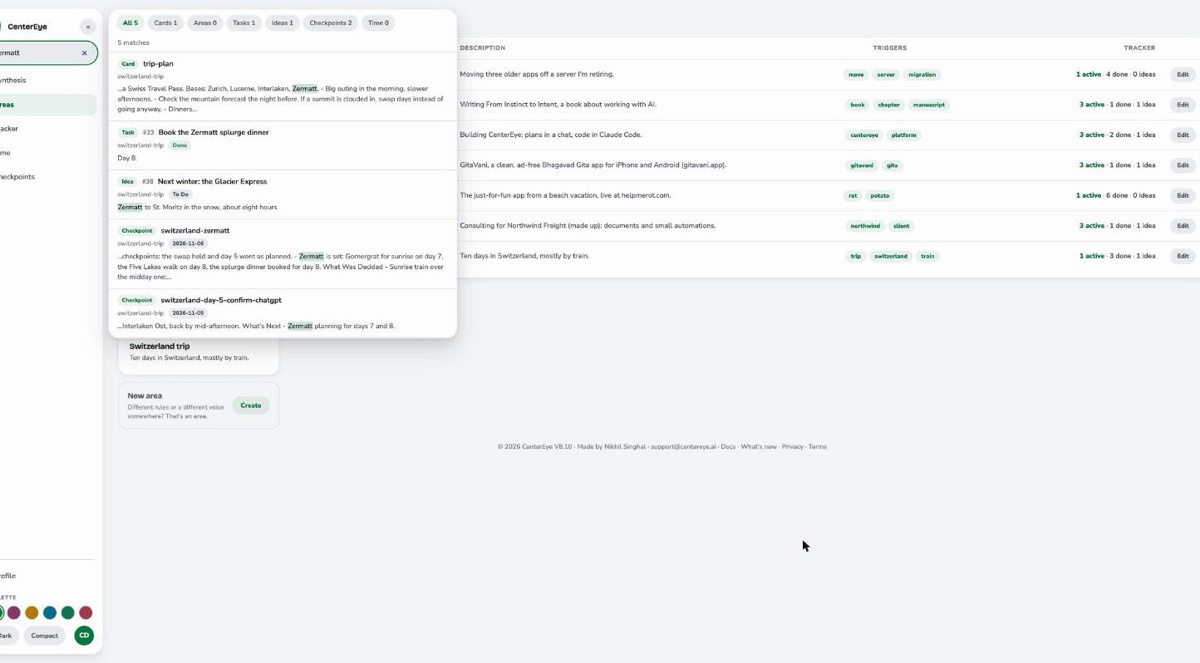
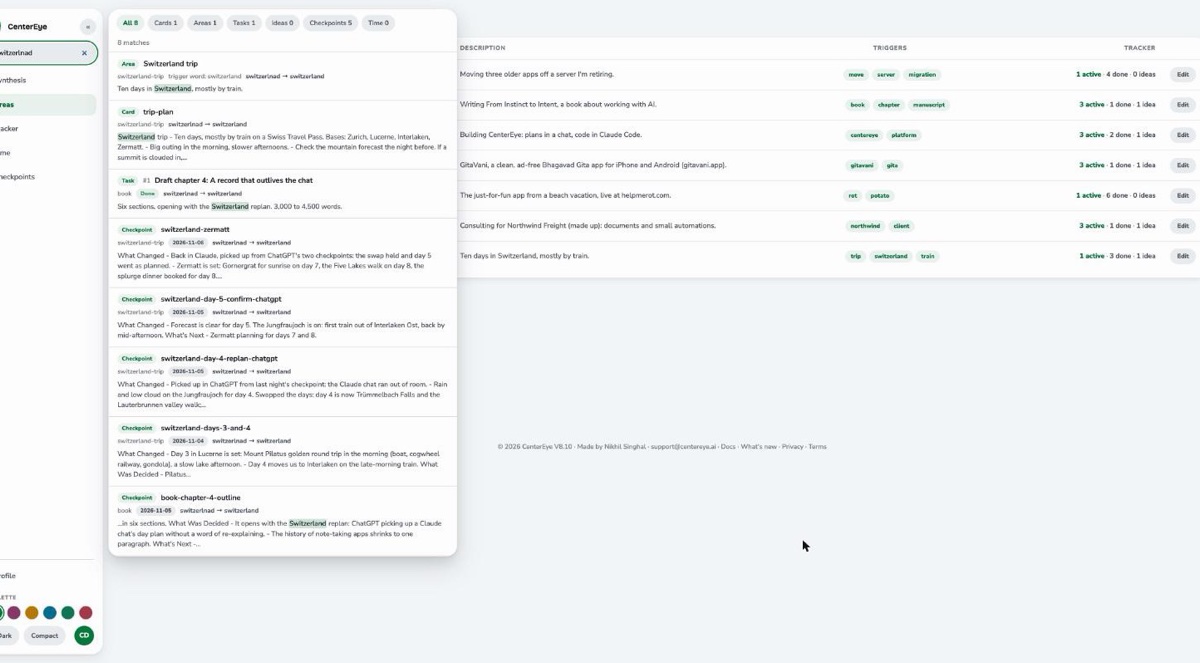
- Search on the website. On centereye.ai, the search box sits at the top of the left menu. On a phone, tap the search button at the top of the screen. On a computer, Cmd+K or Ctrl+K jumps to it. Results appear as you type.
- Open a result where it lives. Click a result and it opens in the page you already use: a task in the Tracker, a card in its area, a checkpoint in Checkpoints.
- Narrow it with one tap. Pills above the results show how many matches each type has. Tap Cards, Tasks, Checkpoints or another type to see only those.
- Typos are fine. Search handles word endings and most typos. When it corrects a word, it shows you the correction.
- Your AI adds the meaning. Search matches words, not ideas. When you describe a topic, your AI can also try related words a note might use.
- Your lists can be searched too. Your AI can look for words inside your cards, areas, tasks, ideas, checkpoints or hours, including over a date range.
- It stays in your account. A search only looks at your own data.
What it looks like
An example chat:
You: Find the card with my LinkedIn link.
Your AI: It's in your about-me card. Here's the link.
You: What did we decide about the Zermatt dinner last week?
Your AI: Your November 6 checkpoint has it: the splurge dinner is booked for day 8.
Things to say
- "Find the card that has my LinkedIn link."
- "Search my notes for anything about the Zermatt trip."
- "What did we decide about pricing last week?"
- "Which tasks mention the renewal contract?"
Screenshots
From CenterEye's demo account.
For your AI
If you're an AI reading this for someone: call search with query, the most distinctive word or words, and related, other words a matching note might use. It matches words, not meaning. types narrows it to any of card, area, task, idea, checkpoint and time. Each result names the call that opens it. card_list, area_list, task_list, checkpoint_list and time_list also take keyword. For a date range, use checkpoint_list or time_list with keyword. A close match never chooses an area for boot: if boot can't find one, ask the user which one.
November 15, 2026: Ideas
A task is something you've committed to. An idea is something you might do. Until now, ideas went in as tasks and stayed open for months. The task list looked heavier than the work. Now ideas have a place of their own.
What changed
- Park an idea from any chat. When you mention something you aren't ready to act on, your AI saves it as an idea in the right area. It tells you in one line: "Parked as idea #531."
- Each chat starts with the area's newest ideas. When your AI loads an area, it sees the open tasks. Next to them, it sees that area's newest open ideas and how many there are.
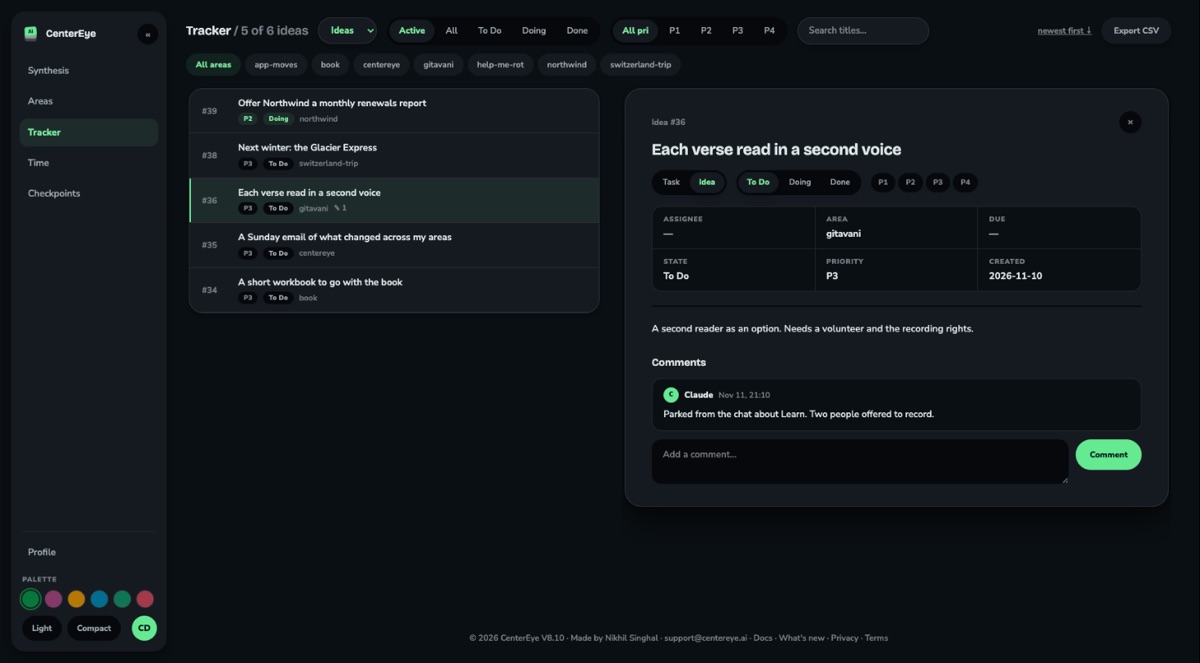
- Turn an idea into a task when you're ready. Say you're going ahead and your AI makes it a task. It keeps its number and its notes. A task can go back to being an idea the same way.
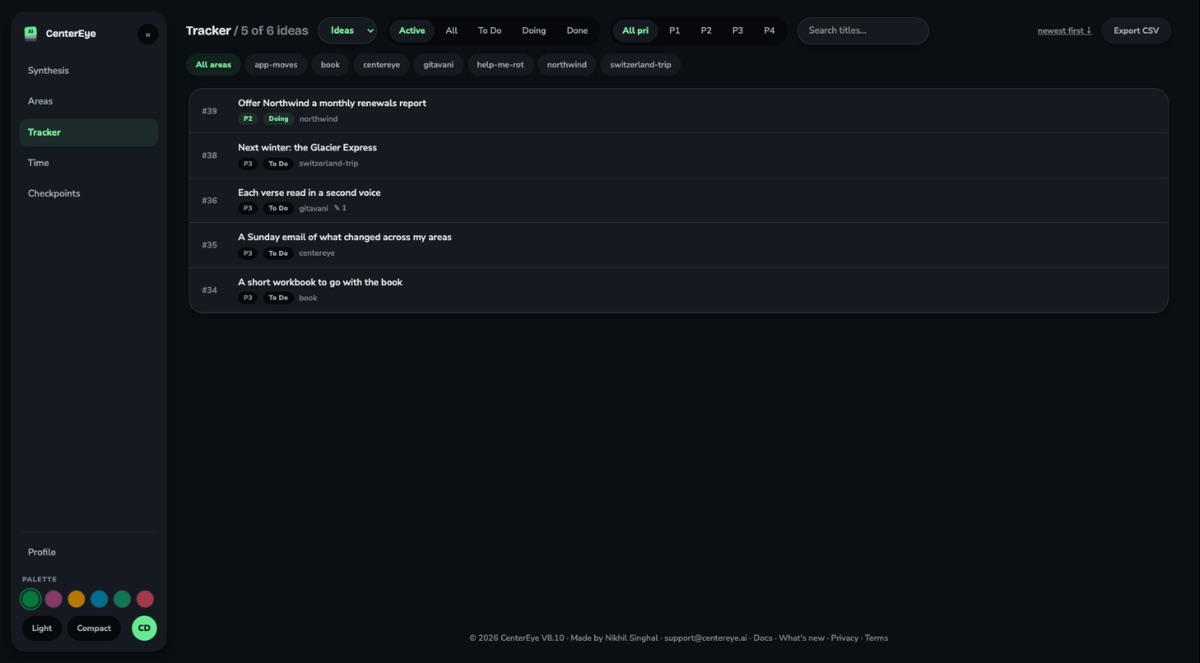
- Tasks is now the Tracker. On centereye.ai, switch between Tasks and Ideas at the top of the page. Open any entry to turn it into a task or an idea. The Areas page shows each area's ideas next to its tasks. A new idea is To Do. It's Doing while you explore it and Done once you let it go.
- The synthesis knows about ideas. It counts them apart from your tasks and mentions new ones where they matter. Ideas don't count as work that's due.
- Your AI closes tasks now. When a task's work is done, your AI closes it and tells you in one line: "Closed #530." It asks first only when it isn't sure the work is done. Would you rather it always asked? Ask your AI to add this rule to a card that loads in every chat: "Ask me before closing any task."
What it looks like
An example chat:
You: I keep thinking about a second location next spring. Not now, though.
Your AI: Parked as idea #531 in your business area.
You, a few weeks later: Let's go for the second location. The first step is signing the lease.
Your AI: Done. #531 is a task now. Your notes came with it. I added #534 for the lease.
You, later still: The lease is signed.
Your AI: Closed #534.
Things to say
- "Park an idea: a newsletter for the shop."
- "What ideas do I have for the book?"
- "Let's go ahead with the newsletter idea."
- "Drop the newsletter idea."
Screenshots
From CenterEye's demo account.
For your AI
If you're an AI reading this for someone: CenterEye's task tools now take a type, "task" (the default) or "idea". To park an idea, call task_create with type "idea". To list ideas, call task_list with type "idea", or type "all" for both. To turn an idea into a task, call task_update with the changes {"type": "task"}. State changes go through task_update too. {"state": "Done"} closes a task or lets an idea go. {"state": "To Do"} reopens either. The task_close and task_reopen tools are gone. If your tool list still shows them, it's out of date: reconnect CenterEye. If one of the user's cards says to ask before closing, ask.